WFSB First Alert Weather
- 4.6
- Rating
- 10.00K
- Installs
- Free
- Price
 Analysis by App-foxy
When the weather decides whether I leave early, carry an umbrella, or change a weekend plan, I want a forecast that feels connected to where I actually live. That is the main reason I found WFSB First Alert Weather useful. It is a free weather app from Gray Media, built around the WFSB viewing region rather than trying to be everything for every place on the planet.
That local focus makes a difference in everyday use. I am not opening it for a world-weather tour or a collection of elaborate climate charts. I open it when I need a quick answer: Is the rain likely to affect my commute? Should I wait before taking the dog out? Is the evening drive worth starting now? The app is at its best when the question is practical and location-based.
From a weather question to a practical decision
The first step is simple: I open the app when I already have a decision in mind. That starting condition matters because the app works more naturally as a local planning tool than as a deep weather research station. Its store summary centers on the latest weather for the WFSB viewing region, and that description matches the way I approach it: check the local situation, understand the immediate outlook, and decide what to do next.
You May Also Like

 AccuWeather: Weather Radar
AccuWeather Review: A Quick, Clear Forecast for Everyday Decisions
For everyday plans, the best forecast is the one you can understand quickly. AccuWeather makes rain timing, radar, and local conditions easy to act on, with a few trade-offs.

 Hill Climb Racing
Why Hill Climb Racing Still Turns Crashes Into One More Run
A tiny car, a bumpy hill and one more upgrade: Hill Climb Racing keeps resurfacing because its simple chaos makes every near-miss feel personal.

 AliExpress - Shopping App
AliExpress Makes Global Shopping Feel Personal, but Shoppers Bear the Risk
AliExpress turns a global marketplace into a pocket-sized discovery engine. Its reach is useful, its shopping loop compelling, and its trade-offs easy to miss.

 Lords Mobile: Kingdom Wars
Lords Mobile Is a Kingdom-Building Routine, Not a Quick Match
A case-by-case verdict on the building, battles, device demands, and social commitments that make Lords Mobile rewarding for some players and exhausting for others.

 PDF Scanner app - TapScanner
TapScanner Makes Paperwork Easier to Capture, Check, and Share
TapScanner makes scanning with a phone feel less like a rescue operation and more like a dependable step in getting work done. Its capture tools are useful, though not flawless.

 Block Blast!
 Shows How Much a Puzzle Game Can Leave Out
A quiet grid game shows why puzzle players increasingly value instant clarity, repeatable skill and low-pressure play—and where the genre still needs to catch up.
More From Our News Desk
View All News


On a normal morning, I use it before getting dressed. I look for the broad shape of the day rather than obsessing over one precise number. If the morning looks calm but the later period appears unsettled, I can adjust my plans before stepping outside. That is more useful to me than reading a long forecast after I have already left home.
The app is also a sensible choice for people who primarily follow local coverage. Because Gray Media develops it for the WFSB audience, its identity is tied to that regional context. Someone who already turns to WFSB for local information may find the app easier to fit into an existing routine than a large international weather service with a more generalized presentation.
Installation is straightforward for supported devices, and the app is free. It is rated for Everyone, so it is suitable for a household where different people may need to check conditions. Its current version is 6.1.701, and it runs on Android 9 or later. Those details are worth checking before installing on an older phone, especially if the device is kept as a backup rather than updated regularly.
How I use it before leaving home
My first pass is deliberately quick. I check the current local conditions, then move through the forecast far enough to understand whether the weather is stable or changing. That second step is important: a comfortable temperature at the moment does not tell me whether rain, wind, or a rapid change is waiting later.
I then compare the forecast with the actual plan. For a short errand, the immediate conditions matter most. For a school run, work commute, or appointment across town, I care more about the transition between the start and end of the trip. This is one of the app’s useful workflow lessons: a forecast is not an instruction by itself. I still need to translate it into clothing, travel time, and flexibility.
For example, imagine I have a morning appointment and an outdoor task afterward. I would check the app before breakfast, note whether the weather changes during that window, and decide whether the outdoor task should happen first. If the outlook looks uncertain, I would avoid treating a single glance as final and check again closer to departure. That small habit is more reliable than assuming the first forecast will remain unchanged all day.
The strongest habit is to use the app as a decision checkpoint, not as a promise. Weather forecasts are useful because they reduce uncertainty, but they cannot remove it. WFSB First Alert Weather feels most valuable when I use its local information to make a flexible plan rather than expecting absolute precision.
Passing the information to someone else
Weather information often has a handoff. I may check it first, then tell a partner whether we should leave earlier, remind a family member to bring a coat, or decide whether an outdoor activity needs a backup plan. In that situation, I do not pass along every detail. I summarize the part that changes the decision: the timing, the general trend, and how confident I feel about the plan.
This is where a local app can be more useful than a broad alternative. A national weather service may offer a huge amount of coverage, but I may spend more time filtering it down to the place I care about. WFSB First Alert Weather is narrower by design, which can make the handoff easier when everyone involved is concerned with the same regional conditions.
There is also a practical trade-off. If the person receiving my message lives far outside the WFSB viewing region, the app is no longer the natural shared reference. I would use a service that covers both locations consistently instead of asking someone else to interpret a local forecast from an area they do not follow. The app’s regional strength is also the boundary of its usefulness.
Using the app during a changing day
The second check is often more important than the first. Morning conditions can create false confidence, particularly when the day is expected to shift. I reopen the app before a longer drive, an outdoor lunch, or an evening event. The point is not to stare at the forecast repeatedly; it is to catch meaningful changes before they become inconvenient.
That workflow is especially helpful when I am responsible for other people. A parent arranging pickup, a volunteer coordinating an outdoor activity, or a worker moving between locations needs a current local reference before committing. I would still use judgment for serious conditions and follow official local guidance, but the app provides a convenient place to begin the check.
One non-obvious advantage of this approach is that it separates planning from confirmation. I can make a rough plan in the morning, then confirm the details near departure. That prevents me from overreacting to an early forecast while also avoiding the opposite mistake of ignoring a developing change.
What happens after the forecast check
The result I want is not a screen full of information. I want a clear next action: take rain protection, move an errand earlier, allow more travel time, or keep the original plan. WFSB First Alert Weather supports that kind of outcome because its purpose is direct local weather access rather than a complicated productivity system.
For a short daily routine, that simplicity is a benefit. I do not need to create a project, maintain a list, or learn a specialized interface. I check the weather, interpret it in the context of my day, and close the app. The experience feels appropriate for quick decisions that happen several times a week.
It can also help reduce unnecessary checking elsewhere. Instead of jumping between a browser search, a general weather app, and local news pages, I can begin with the regional source that matches my location. That does not mean it replaces every other weather tool, but it gives me a focused first stop.
Where the workflow becomes less comfortable
The biggest limitation is regional scope. If I travel often, manage plans in multiple states, or need a consistent view of several destinations, a broader weather app may be more efficient. WFSB First Alert Weather makes the most sense when the WFSB region is the place I repeatedly need to understand.
I would also skip it if my priority is advanced weather analysis. Some users want extensive historical comparisons, specialized charts, detailed international coverage, or tools designed for aviation, hiking, or professional operations. This app’s value is not that it replaces every specialized service. Its value is that it gives ordinary local planning a convenient home.
Another point of friction is human rather than technical: the forecast still needs interpretation. A person looking only at the current condition may miss what is expected later. A person who treats every update as exact may become frustrated when reality differs. I get better results when I read the forecast as a changing outlook and connect it to the timing of my own activity.
There is also a handoff problem when a household uses several weather sources. If one person checks a national app, another checks a browser result, and I check WFSB First Alert Weather, we may discuss slightly different views of the same day. The solution is not necessarily to abandon this app; it is to agree on which source is the shared local reference and to compare updates at similar times.
Who will get the most from it
I would recommend it to people who live in or regularly follow the WFSB viewing region and want a free, local-first weather app for ordinary decisions. It suits commuters, families, students, and anyone who wants a quick regional check before leaving home. It is particularly practical for users who prefer local coverage over a large, impersonal weather catalog.
The audience size gives some useful context without changing the experience. The app has passed 10K installs, carries a 4.6 average from around 500 ratings, and has about 170 written reviews. Those figures suggest a modest but clearly engaged user base, rather than an app that depends on massive worldwide reach.
I would be more cautious about recommending it to someone who spends most of the year traveling, needs forecasts for several countries, or wants weather information for highly specialized activities. In those cases, a larger service with broader location handling or more technical tools may be the better primary option. WFSB First Alert Weather can still be useful as a local reference when visiting its coverage area, but it would not be my only weather app for a mobile lifestyle.
My final assessment after following the full routine
What I like most is the clear relationship between the app and the decision I am trying to make. I start with a local question, check the current situation and the upcoming change, pass the useful part to whoever needs it, and turn that information into a flexible plan. That complete workflow is more valuable than a collection of weather facts that never affects my day.
Gray Media has positioned this as a regional weather companion, and that focus is both its main strength and its main limitation. It is not the tool I would choose for global travel or deep meteorological analysis. It is the tool I would open when local conditions matter and I want a fast route from uncertainty to action.
For me, the best way to use it is to check twice when the day matters: once while planning and again before committing. That simple routine accounts for changing conditions without turning weather checking into a constant chore. If your life is centered on the WFSB region, the free price and Everyone rating make it easy to try, and the focused design gives it a reasonable place alongside broader alternatives.
Overall, I see WFSB First Alert Weather as a practical local weather app rather than an all-purpose forecasting laboratory. I would install it for regional awareness, use it to guide everyday choices, and keep a broader service available only when my needs move beyond its natural coverage. For the right user, that is a useful balance: less searching, a clearer local starting point, and enough information to make the next decision with greater confidence.
FAQs for WFSB First Alert Weather
01What features does the WFSB First Alert Weather app offer?
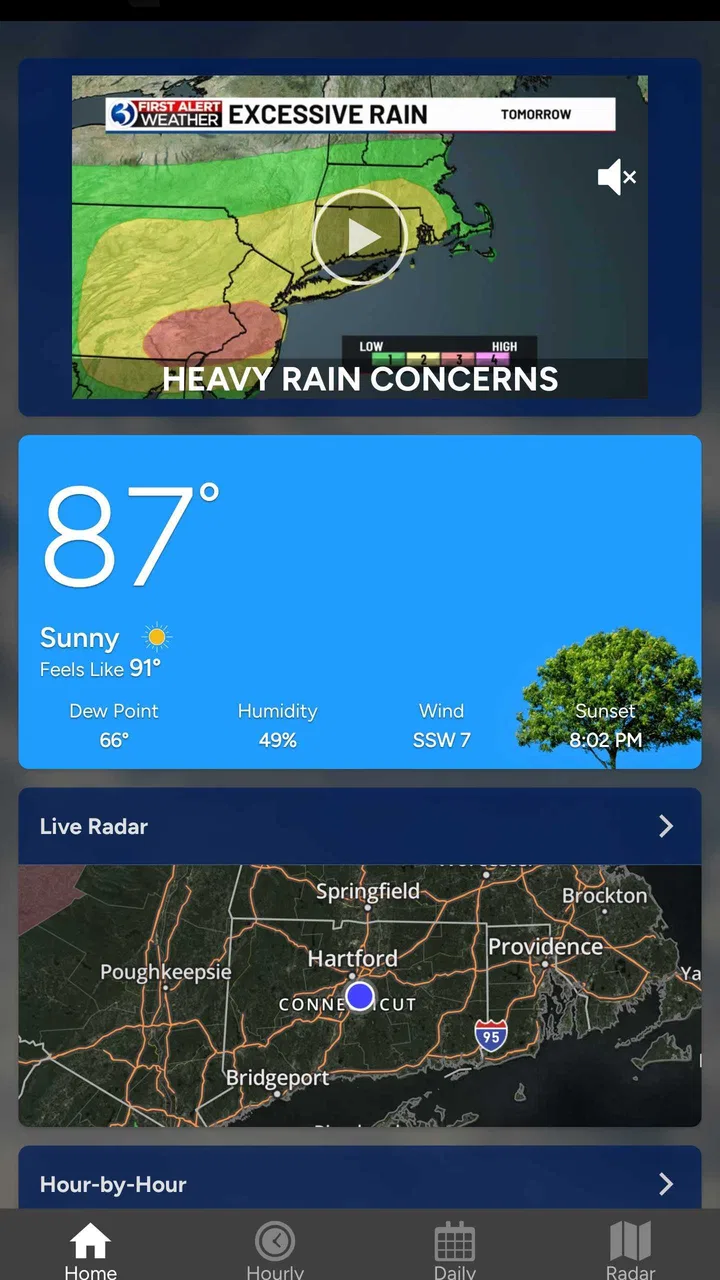
The WFSB First Alert Weather app provides a comprehensive suite of features including real-time weather updates, interactive radar, and personalized weather alerts. Users can access hourly and 7-day forecasts, as well as detailed weather maps. The app also includes video forecasts and news updates to help users stay informed about weather conditions.
02Is the WFSB First Alert Weather app free to download and use?
Yes, the WFSB First Alert Weather app is free to download on both Android and iOS platforms. While the core features are accessible without charge, the app may offer in-app purchases or display advertisements to support its development and maintenance. Users can enjoy most functionalities without any cost.
03How accurate are the weather forecasts provided by the app?
The WFSB First Alert Weather app is known for its accuracy, leveraging advanced meteorological data and technology. The app utilizes local weather station data and radar to provide reliable forecasts. However, like all weather predictions, accuracy can vary based on changing conditions, so users should stay updated with frequent checks.
04Can I customize notifications for severe weather alerts?
Yes, the app allows users to customize notifications for severe weather alerts. You can set notifications for specific weather conditions such as thunderstorms, tornadoes, or hurricanes, and choose the regions for which you want to receive alerts. This feature ensures that users receive relevant and timely warnings based on their preferences.
05Does the app require an internet connection to function?
An internet connection is necessary for the WFSB First Alert Weather app to function optimally. It relies on real-time data updates and radar imagery, which require an active connection. However, users can still access previously downloaded forecasts and alerts offline, but these will not update until connectivity is restored.
Pros
- User-friendly interface for quick navigation.
- Highly accurate local weather forecasts.
- Customizable alerts for severe weather.
- Detailed radar and satellite imagery.
- Real-time updates keep you informed.
Cons
- Ads can be slightly intrusive at times.
- Occasional slow loading of certain features.
- Limited international weather coverage.
- Some users report minor notification bugs.
- Requires a stable internet connection.

WFSB First Alert Weather
Gallery